**Agile Framework**
The team
Roles
Product success accountable person:
- Define the product vision.
- Add value.
- Represent the client.
- Define epics, milestones, and priorities.
- Grant the definition of done.
- Keep scope and budget.
Project facilitation accountable person:
- Coordinate events.
- Organize issues in Jira.
- Create and close sprints.
- Maintain the issues backlog.
- Supervise Jira's issues, their language, score, and other aspects.
- Follow the rules described in this guide, in general.
Project managers may delegate one or both of these roles. This delegation must be explicit, ideally, at the project kick-off or at any time if it might benefit the project.
There must also exist a** Technical Lead **to facilitate the integration of the project development. Activities for this role must include:
- Integrate source code repositories.
- Create a continuous deployment strategy for a dedicated testing environment.
- Supervise software versions and releases, including the deployment to staging and production environments.
Events
The Sprint
The default sprint duration is two weeks. It is possible to decide on a different timing if this is beneficial for the project at a given stage. Still, it is vital to avoid a constant variation because it will prevent learning the team's velocity and plan the sprints adequately.
It is crucial to avoid the inclusion of new tasks in the sprint or to iterate on the tasks that are in an active sprint.
The Project Meetings
Attending a project meeting is mandatory for all members involved in a project. The meeting can include two of the following activity blocks; however, it is possible to hold a separate meeting for any of these specific events if needed.
In chronological order:
- Backlog refinement -
Always before a new sprint.
-
Discuss possible sprint goals.
-
Review user stories to clarify doubts, identify gaps, and add detail.
-
Discuss and agree on high-level tech solutions and update the tickets with necessary information regarding the agreements reached.
-
Estimate the effort of the user stories.
-
Split user stories if the estimation is too big to fit in a sprint.
-
Review backlog prioritization.
- Sprint planning -
Always after backlog refinement.
- Agree on the Sprint Goal (should be aligned with the roadmap)
- The team will include the User stories or tasks needed to reach the agreed sprint goal based on the team’s velocity.
- Start the sprint.
Once the sprint starts, the first activity will be the “task breakdown,” where the development team will create the necessary subtasks to reach the goals of each requirement (user story or task).
- Current sprint status -
After first week of sprint (also daily if possible).
- Track the progress of the current sprint.
- Discuss blockers, issues, and doubts.
- Discuss any potential risk for the sprint goal, including possible unfinished tasks.
- Close sprint and Retrospective -
When the sprint has ended
- Review previous retrospective actions.
- Sprint revision and retrospective.
- Did we reach our objectives?
- What went well, and should we keep doing it?
- Is there anything to improve in the next sprint?
- Agree on actions to improve.
- New features demo.
- Review the project budget.
The Daily Meeting
The Daily meeting is an optional event. The recommendation is to have daily meetings when the development process gains complexity, urgent delivery, or any other risky situation.
The daily meeting duration is fifteen minutes or less, having the principal goal of keeping the team synchronized and assuring the sprint success. It is essential to check for blockers and discuss the most efficient strategies to solve shared problems.
Working in Jira
Setting up a project
Project initialization
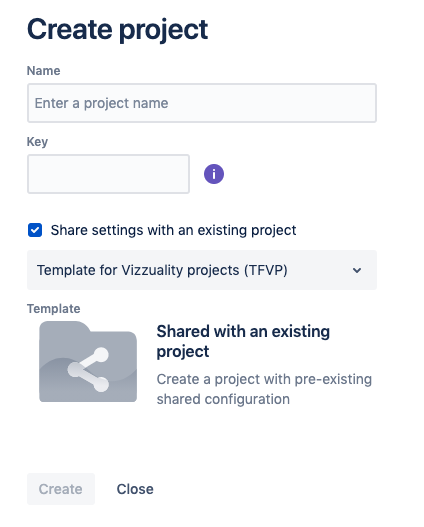
Users with the Jira admin role can set up projects. It is essential to follow the steps described here, to get all the correct configuration options. Simultaneously, not following these steps will add several unwanted artifacts to the Jira administration panel.
- Click on the menu item "Project" > "Create a project."
- Select "company-managed" project.
- Enter the project name and key. The project key is used as a prefix of the project's issues. The recommendation is to use a descriptive character combination.
- Mark the checkbox "Share settings with an existing project." This step is crucial; if omitted, please, contact a Jira super-admin at Vizzuality.
- Select "Template for Vizzuality Projects (TFVP)" on the dropdown list.
- Click on "Create."
Setting up the project board
The user must be part of the project's team to complete the following procedure. If the project board is not visible, this is probably the cause.
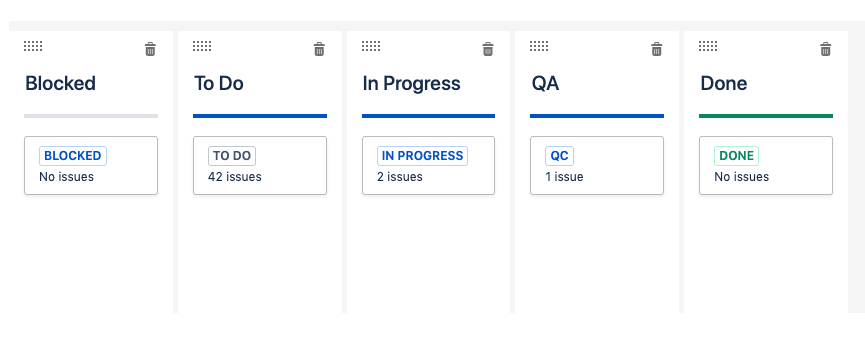
- Click on "Board name" (on the side panel).
- Click on the three dots of the upper right corner and select "Board settings."
- Add two new columns with the names "Blocked" and "QA."
- Drag the status cards "QC" and "Blocked" to their respective columns. These appear initially under the "In Progress" column.
The board should contain the columns “Blocked”, “To Do”, “In Progress”, “QA”, and “Done”, with their corresponding status cards inside.
Project roles in Jira
There are the following project roles in a Jira project:
- Administrators: A project role that represents administrators in a project. An administrator has permissions for all the project settings and options.
- Atlassian-addons-project-access: A project role that represents Connect add-ons declaring a scope that requires more than reading issue permissions
- Vizzuality Team: Default project role for the Vizzuality team. This role has permission to operate with all the project functionalities.
- Collaborator: Project role for external developers. This role has the same permissions as the Vizzuality Team member, except sprint management and other minor details.
- Customer: Project role for customers. This role has permission to create and comment issues only.
Issues
Issue types
- Epic: A big user story that needs to be broken down. Epics group together bugs, stories, and tasks to show the progress of a larger initiative. In agile development, epics usually represent a significant deliverable, such as a new feature or experience in the software. Epics are also the milestones displayed in the Roadmap.
- Story: A user story is the smallest unit of work that needs to be done. It maps to a feature that the user can test.
- Task: A task represents work that needs to be done. The principal difference with a story is that a task does not map directly to a feature that a user can test.
- Subtask: A subtask is a piece of work that is required to complete a task. Subtasks issues can break down any standard issues in Jira (bugs, stories, or tasks).
- Bug: A bug is a problem that impairs or prevents the functions of a product.
- Spike: An investment to make a story estimable or schedulable.
- Incident: A System outage or incident occurred at a given moment.
- Problem: Track underlying causes of incidents.
Writing issues
Issues must be written descriptively and comprehensively. It is imperative to validate these criteria before adding a task to the sprint. In particular, for these fields:
- Summary. The summary must be short, but it has to offer enough context and information to understand the issue's nature and validate it without extra information. When it is a User Story, the recommendation is to place the user in the context, as in this example: "User can change the range of dates of data shown in the dashboard charts." When the issue is of type "task", it can be written in a straightforward and imperative language, for example: "Create the data migration to include the user roles."
- Description. The description is a longer text where all the details for the current task are written. This field may include links, steps to reproduce, minor details or edge cases, together with any other information that will clear any possible doubt to the issue assignee.
It is important to note that the "Summary" field equals the issue's description into the release notes. It must be meaningful outside the Jira backlog.
Story Points
Story points are the way to represent the level of effort required to complete a given issue. These are the scores to use and their description:
1. This story could be easily done; I can do three or four like that one in a morning.
2. I know how to do this story. Some clearly defined steps need to be taken in order to complete it. I have done some similar stories in the past. I can do a couple or three stories like this in a day.
4. This story is quite significant; it involves several steps and touching a nice amount of code, files, views, designs. I am confident about how to do it. It should not take more than one day to do it, but it will benefit from a thorough peer review. It is not something that could be easily done with many context switching or intersperse communication.
8. This story is significant or complicated. Some communications between functional areas will be involved, and it will probably take slightly more than a day.
16. This story is complex and may take several days. We may consider splitting it into two or more if that is possible.
Sprint Planning
A sprint should follow the following premises:
- The sprint must have a defined goal.
- Issues must contain a precise definition, both in the language and in the scope of work. If a task is not defined or is a candidate for iterations, it should not be part of the sprint; it is possible to write a spike issue to get a clear definition instead. If an issue is poorly described or the summary is not clear enough, it should be rewritten.
- Issues must have story points assigned.
- Issues must belong to a software version; it is possible to change this version later if the resulting feature is not ready for release within that version.
- Sprint candidate issues have a greater priority than other backlog issues. Product, client, or development needs, establish this priority.
- The team's velocity determines the number of issues included in a sprint. If there are no team velocity indicators yet, it is possible to consider setting a velocity goal and iterate in future sprints. The velocity goal is always prone to be improved.
- It is critical to check the individual's workload for a sprint, filtering by a given user and looking at the total story points. This initial indicator must be used in conjunction with the individual's appreciation, vacationing, absences, and project dedication.
Continuous delivery
The technical lead will facilitate a continuous delivery system where the quality assignees can test all the issues when these take part in the "QA" column. This environment must be different from the production environment, and different back-end and front-end technologies may integrate the system.
Currently, projects which have a separate front-end CI/CD process use Vercel, in some cases only for development purposes, and in some also in production. For the back end, and for those projects with a unified BE / FE process, we use Jenkins, Capistrano, GH Actions, Travis CI, docker images, Code Climate (for test coverage).
Quality assurance
Passing issues to quality assurance
There are three requisites to move an issue to the QA column:
- The issue must be testable; this usually means deployed to a development environment. Developers are currently writing the strategies and guidelines for continuous deployment.
- If it is a user story, a user acceptance test is required in the form of Given, When, Then. There is a specific field for that into the Jira issue form.
- At least one reviewer must be assigned to the task.
Who reviews work
It is possible to assign an issue for design, data, development, and acceptance test. Please, note that "development review" is not "code review," and it does not mean the acceptance of a pull request (as this procedure will take place in Github, as usual). The minimum for an issue to be delivered is to pass the "acceptance test." Still, it is also possible to add reviewers from different functional areas to check the feature using their vision.
Reviewers will get a notification including a link to the issue, where they may see the context make the checks for their functional area and try to pass the acceptance test (even if this is marked as "yes"). The first reviewer that finds a problem should leave a comment and move the card back to "in progress." There is no need for the other reviewers to look if one already found a problem. The issue assignee will get a notification, also the other reviewers.
The original issue assignee is responsible for passing the card to "Done" once all tests have passed. Remember that the user acceptance should pass too.
Releases
Using software versions, we can have a collection of the issues that are ready to deploy. Just bear in mind that software versions are not sprints; one version may contain different sprints or the other way around. Software versions reflect the application state, not the progress.
Every release is attached to a software version; these are in Jira in the "Releases" section. It is essential to associate individual issues with software versions initially; this procedure leads to better control and defines release notes.
Release notes are the tool to keep stakeholders updated on the project status and the new functionalities incorporated with a new deployment. Allowing clients in the project backlog and board is exceptionally possible, but the common practice must be to use Jira to develop and not communicate.
Incident response
Delivery of the sprint goal will sometimes be affected by responding to expedited requests, like incidents in production environments. The approach we take is that as we keep tracking the team's velocity, the effect of such incidents on sprint delivery will be reflected in that metric, allowing us to plan sprints more realistically.
Production incidents are the most obvious sign of low quality from the client's perspective, and we should strive to reduce their number of occurrences and criticality by better QA practices. To better understand the problem and see the improvements from our quality processes, we should track those incidents, particularly the time spent fixing them. We can follow these steps:
- Create an "Incident" issue, for that matter. This issue will help watch how many incidents happen; this type of task should not be seen very often, as having many of these is a clear indicator that something is not working as it should in the QA or development process. Log the work for this incident by clicking on the issue details, Activity > Work log > log work.
- Create a "Problem" task if the fault is structural and requires more than solving the incident (you can plan when you need to work on this later).
- Create a release just for the hotfix.
Definition of Done
An issue is done when:
- It works as requested. The functionality meets the requirements and acceptance criteria.
- It was tested. It passes all necessary tests, and no regressions have been introduced.
- It is visible to others. The changes are accessible (e.g., merged to the correct branch, deployed to the expected environment, or otherwise ready for use).
Exceptions for this framework
The framework described in this document must be adopted in every project; it is an essential part of our standardization process. There may be exceptions to satisfy the client or other stakeholders' demands for a given situation or when the project itself has justified requirements.
For these cases, it is possible to implement an exception both for the project framework and the Jira scheme. A dedicated meeting must address the possible solutions, including a Jira super-admin and other accountable persons.