Project Life Cycle.
Intro
In this section of our playbook we intend to establish a common work methodology for project management and describe our typical project life cycle. The goal is to optimize our work processes and standardize procedures as much as possible, so that every person is familiar with them. Moreover, by establishing a common process, we are bringing transparency and clarity to our practices, and with it, enhancing the way we care for and support one another. While we encourage consistency, exceptions are allowed when clearly justified. These procedures are meant to guide our work, not replace critical thinking or open conversations whenever needed.
Project life cycle
Independently of the diversity of our projects, we like to follow a common approach and process so that we can optimize the way we work together. To attain this consistency within the company, it is important that the whole project team understands and follows the different project phases and the most important rituals a project entails. Under this framework we intend to create the conditions that pull people into greater levels of development, performance and accountability. With this structure we can also enhance the performance and feedback culture that will allow us to grow individually and as a team.
What are the project phases?
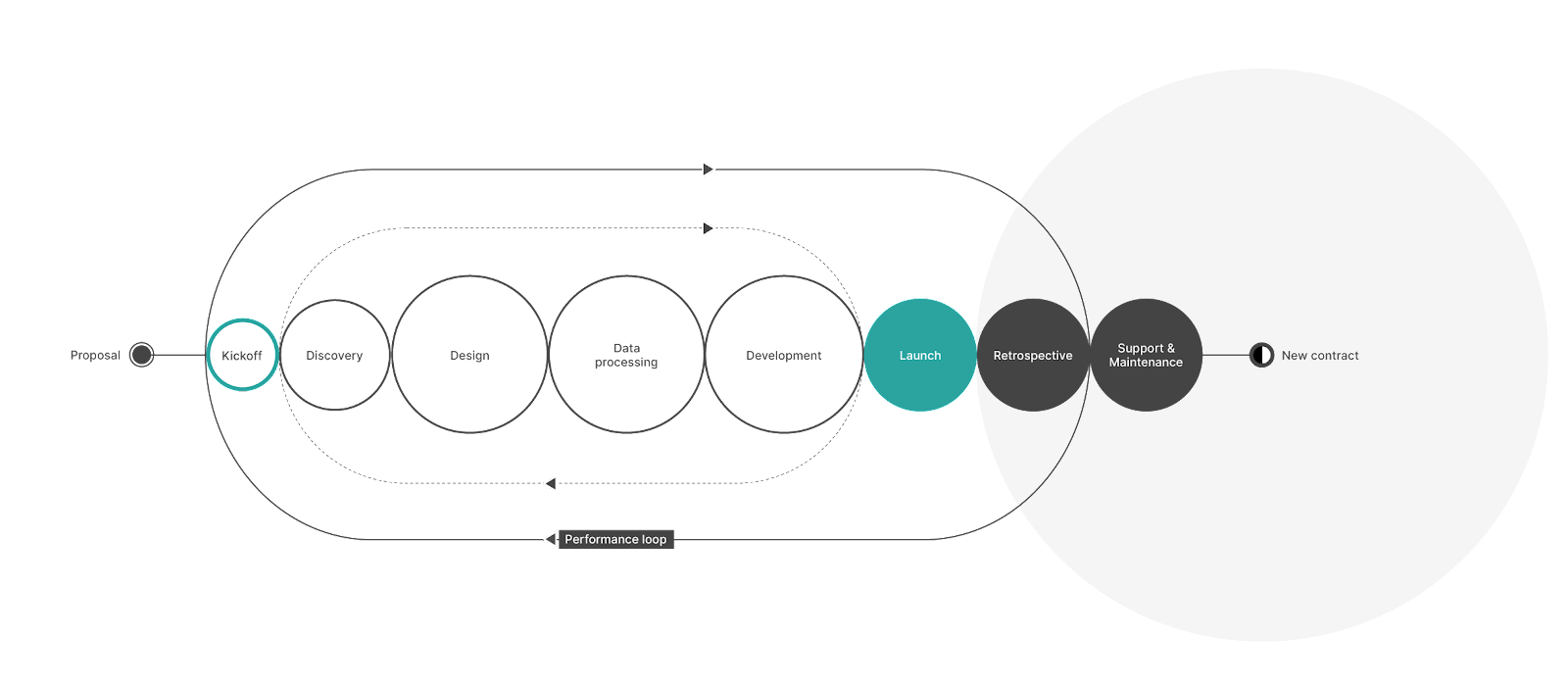
In a standard Vizzuality project, we typically have 8 phases. They don’t necessarily need to be sequential, and actually, most of the time, many happen in parallel.
- Proposal writing - BD responsibility
- Kickoff - organized by BD and PM
- Discovery - project team responsibility
- Design - project team responsibility
- Data processing - project team responsibility
- Development - project team responsibility
- Launch - project team responsibility
- Final retrospective - organized by the PM
- Support and maintenance - optional phase, PM and BD
What is a ritual?
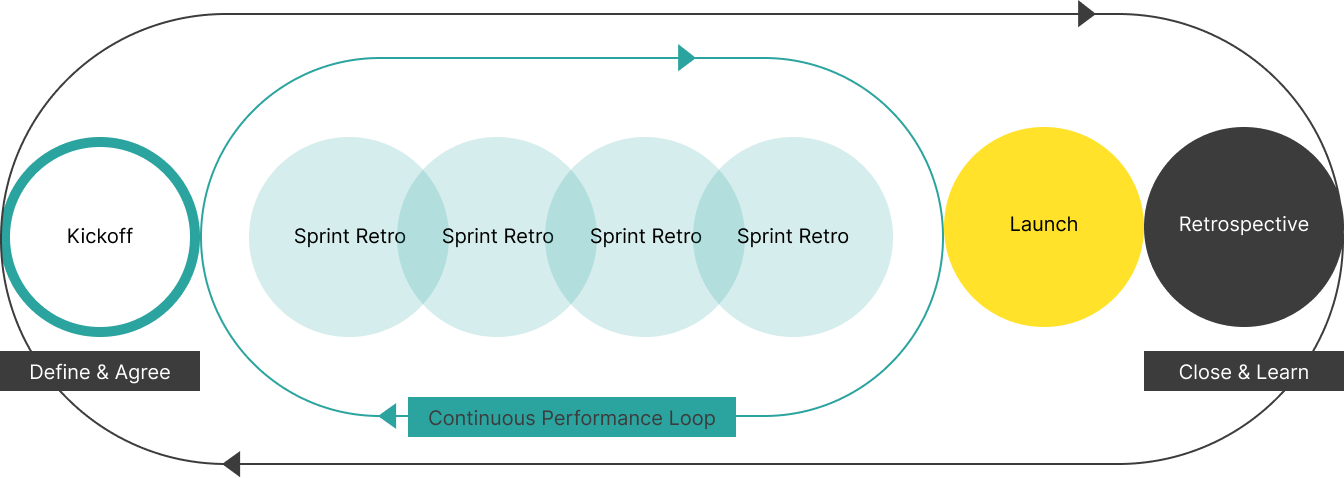
A ritual is a formal “space” within the project life cycle to make things explicit, agree, document, review and learn from each other. There are two main rituals in every project life cycle: the kickoff and the retrospective. Together they form the performance loop, since on the first ritual we agree on how to work together and we define individual responsibilities, and on the second ritual we revisit those commitments and pledges and explore ways to improve.
In agile projects, this performance loop is continuous, reinforced through sprint retrospectives that allow teams to regularly evaluate and adapt throughout delivery and not only at the end. These ongoing feedback cycles strengthen collaboration, ensure faster learning, and drive consistent improvement.
Formalised feedback loops improve performance and growth. Feedback and evaluation are not simple admin or bureaucratic tasks that we do just to check a box. They are key components for the solid construction of a learning and high-performance culture. We need the entire team to know them, understand them, and readily apply them.
This is why, independently of project or PM, kickoffs and retrospectives should be run in similar ways. Not only will all of us know what to expect and what to do, but, having a shared notation system, makes it easier for anyone outside of the team to compare projects and analyse them.
Elements of the rituals
When we perform a kickoff for a new project, and later its retrospectives, we bring together three main elements:
-
Our functional area social contract - what we have collectively agreed to offer as a functional group. This serves as the foundation for how we work across projects. It’s a relatively static document during the lifetime of a project, though it can be revisited when needed.
-
Kickoff - to define and agree. At this stage, we clarify how the Vizz team will collaborate on a specific project: who does what, when, and how. These agreements are documented in the project’s kickoff documentation and in the RACI matrix. Some of these agreements are also relevant to share with our clients, so this is a good opportunity to decide which ones to make publicly visible
-
Retrospective - to fix, close, and learn. Here, we ask: Are we collectively doing a good job contributing to our purpose? We identify processes that could be improved or triggered internally to enhance how we work and grow. Retrospectives are also a chance to celebrate, to highlight what went well and share stories, insights, or successes with the broader Vizzuality team.
Project evaluation & Scorecard
Project evaluations help us make informed decisions by critically assessing our work. Every project should be evaluated by both Vizzuality and the client. These evaluations aim to track project quality and client satisfaction, while also identifying growth opportunities and ways to improve individual and team performance.
Our projects can be assessed from two complementary perspectives:
- Externally, through client feedback and perception of project outcomes.
- Internally, through our own reflection on performance and delivery.
In both cases, we seek to understand how the project performed across three main pillars: time, quality, and experience.
From an internal perspective, we also look deeper, examining our processes, collaboration, and learning opportunities that emerged along the way. To support this, we conduct sprint retrospectives, frequent peer reviews, and will introduce a project scorecard that brings together several key metrics (to be defined).
Together, these mechanisms help us maintain accountability, continuously improve, and ensure that every project contributes to both our collective performance and our long-term growth as an organisation.
Project documentation
All information about our projects is kept in VizzHub and Google Drive. All ISO-relevant information for compliance with ISO 9001, the international standard for quality management systems, is also available in VizzHub.
How do we organize our projects in Google Drive?
We keep all our projects documentation inside Google Drive. All projects main folders are here and a direct link to it can also be found on the sidebar of VizzTracker.
Each individual project adheres to the same folder organization,with exceptions only when clearly justified. The PMs are responsible for creating the project main folder, but everyone must collaborate to keep it tidy. Try not to keep any ongoing work on your personal drive, everything project related, even work in progress, should live in the project's main folder.
What is inside the project main folder?
A standard project folder will include:
- 00 Proposal & Admin - Contracts, budgets, invoices, signed agreements, or links to proposals or administrative documents.
- 01 Onboarding - Kickoff materials, RACI matrix, and business needs doc.
- 02 Discovery - User research materials, interviews, client background materials, discovery reports, glossary and requirements doc.
- 03 Design - Design files or design feedback summaries.
- 04 Data - Data documentation, sources or methodology notes. Note: raw datasets should be stored in respective AWS buckets or similar and not in the project Google Drive.
- 05 Development - Technical documentation, DevOps notes or infrastructure documentation.
- 06 Launch - Launch plans, or any materials related to final handover.
- 07 Deliverables - Final outputs for the client, like reports.
- 08 Retrospective & Quality Assurance - Retrospective notes, client satisfaction surveys, and peer review spreadsheet.
A template of the folder and all respective template documents can be found here.
ISO 9001
ISO requires that we demonstrate how decisions are made, who’s responsible, and how progress is tracked. Our project documentation ensures that from the first proposal to the final retrospective, our steps are traceable, documented, and aligned with our shared standards.
The core ISO-aligned project documents everyone should know and use:
- Logbook – The internal record of all major project events, meetings, decisions, and changes. It also contains all relevant links to project materials, for example links to Figma, environments, etc.
- Business Needs (BN) – Defines the project’s purpose, scope, and context. It’s the main external-facing document and includes a change log. Main agreements with the client are documented here.
- Business Requirements (BR) – Describes what we’re building and why, ensuring clarity between teams and clients.
- Timeline – Outlines deliverables and milestones, also with a change log for transparency.
- RACI Matrix – Defines who is Responsible, Accountable, Consulted, and Informed for key tasks.
- Kick-off Notes – From both internal and external KOs, referenced in the logbook and consistent with the project timeline.
- Project Folder with Code – Created using our standard Drive structure so everyone knows where to find things.
- Document Labels – [INTERNAL], [CONFIDENTIAL], and [PUBLIC] tags applied consistently to manage access and reduce risk. The upstream PROJECTS folder is tagged [INTERNAL], so all documents within it are assumed to be internal unless tagged otherwise. Note: the “Shared” tag is no longer mandatory. If you do use it, don’t include it in brackets and add it preferably to the end of the doc title. To check if a document is shared externally, look for the small shared icon next to the document name.
What can I find in VizzHub?
As the name implies, VizzHub is where we track our work. It gives us a quick picture of the financial health of a project, but it is not only about numbers, it also intends to centralize all project-related materials.
For each project, we have access to:
- Project start and end dates
- Relevant links - here is where we centralize all information for location of google drive folder, gitbub, Figma, etc
- Project total budget
- Estimated progress - based on tasks completed.
- Cost to date & income to date - based on time reports and progress.
- Budgeted and reported time breakdown per functional area
Apart from tracking a project, VizzHub also offers information about our Portfolio, Capacity, Events and other relevant information for day-to-day coordination.
Reporting in VizzHub
At the end of each month everyone at Vizzuality has to fill in their report with the % of time they have spent working on each contract that month. Non-billable activities such as operations or vacation should also be reported. So, at the end of the month, your report should total 100%. This information tracks the cost of each project and allows us to check whether we are within budget or whether corrective measures are needed. These reports are NOT intended to be used as a time tracker software. For this, we usually use Tmetric, but ask your PM whether the project you are working on has any specific time-tracking tools.
For cost tracking purposes on VizzTracker, 5% is roughly equivalent to one day of work. You should disregard bank holidays and differing month lengths, as well as your own dedicated time, since the app already calculates this. Other guidelines for reporting can be found in the “How to report” button of the VizzHub reporting page.